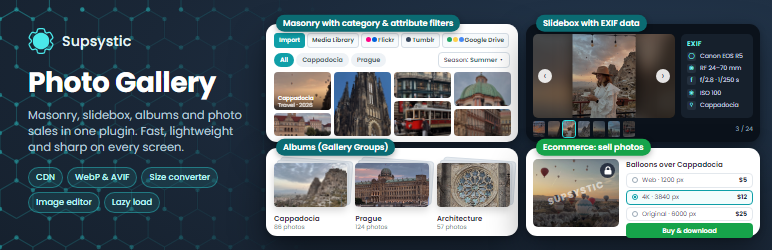

Description
Photo Gallery by Supsystic is a WordPress gallery plugin for responsive photo galleries, image galleries, image carousels and sliders. Tell the creation wizard what the gallery is for, add images from the Media Library in bulk, drag them into order, pick a ready style and publish it with a Gutenberg block, an Elementor widget or a shortcode. No code required.
Unlimited galleries, carousels, sliders and images are free.
Try it in your browser: open a live demo in WordPress Playground – no install, no account.
Three gallery types
- Gallery – a responsive photo gallery in a grid, masonry, justified rows or horizontal layout, with a lightbox and albums.
- Carousel – an image carousel with several photos in a row, arrows, dots, autoplay and swipe. Also a logo carousel and a WooCommerce product carousel.
- Slider – a full-width image slider, hero slider or slideshow with text, buttons and a thumbnail strip.
Each type has its own editor with a live preview for desktop, tablet and phone.
Creation wizard
Choose what you are building – a masonry gallery, an image carousel, a logo marquee, a hero slider, an image viewer with thumbnails or a product carousel – add your images and get a finished gallery in about a minute. Change anything later in the editor.
Ready-made styles and templates
Every type comes with ready styles: colors, corners, shadows, arrows, dots and captions in one click. Switch the style any time, your images stay where they are.
Gallery layouts
- Masonry gallery layout that keeps every photo’s proportions
- Justified gallery layout: neat rows of photos of any shape, nothing cropped
- Standard grid layout with even thumbnails and rounded thumbnails
- Horizontal layout and horizontal scroll galleries
- Fixed columns, with separate column counts for desktop, tablet and mobile
Carousels and sliders
- Autoplay, loop, swipe, keyboard navigation and right-to-left languages
- Slide and fade transitions
- Logo carousel: a running line of client and partner logos that never stops
- Thumbnail slider: a photo slider with a thumbnail strip, like an image viewer
- Text layers with headings, text and buttons on each slide
- A separate image for phones, so every slide looks right on small screens
WooCommerce product carousels
Show your WooCommerce products in a product carousel or product slider with price, rating, sale badge and an Add to cart button. Show the newest, most popular or top-rated products, or pick them by hand. Cards follow your style or the look of your shop.
Lightbox
A modern, responsive lightbox for every gallery type: swipe, zoom, fullscreen mode and a counter, in the colors of your style. Three lightbox themes are included.
Albums with Gallery Groups
Gather several galleries into one album that visitors can browse. Gallery Groups work well for portfolios, events, client folders, projects and travel albums.
Fast image management
- Bulk upload: add any number of images from the WordPress Media Library at once
- Drag-and-drop image ordering
- Titles, captions, ALT text and links for every image
- Borders, corner radius and shadows
- A loader that shows while the gallery images load
Fast and search-friendly
- Carousels and sliders load their scripts only on pages that show them, and the lightbox only when it is turned on
- ALT text and captions are saved with each image, which helps your galleries in image search
- For large galleries Pro adds lazy load, image optimization and CDN delivery
Add galleries anywhere
- Gutenberg block, Elementor widget and shortcode
- Works with Divi, Beaver Builder and other page builders through the shortcode
- One gallery, carousel or slider on many pages: edit it once and every copy updates
Made for
- Photography portfolios and portfolio galleries for photographers and artists
- Wedding and event galleries
- Before and after galleries
- Hero sliders and image carousels on landing pages
- Client and partner logo carousels
- Product carousels for WooCommerce shops
- Travel and food blogs
- Real estate and venue photos
- Agency and client project galleries
Photo Gallery Pro
Pro adds 3D effects, more kinds of slides and tools for selling and protecting photos:
- 3D effects for carousels and sliders: Coverflow, Cube, Flip, Cards and Creative, plus vertical carousels and sliders
- Before and after slider for image comparison: visitors drag a line to compare two photos
- Video galleries and video sliders with YouTube, Vimeo and video files
- Post sliders, post carousels and post feed galleries built from your posts and pages
- Up to 20 text layers per slide with entrance animations
- 100 more ready-made styles, category and icon templates, and all 9 lightbox themes with a slideshow, thumbnails, download and share
- Mosaic layout and filterable galleries with category tabs, filters and search, plus pagination, Load More and infinite scroll
- Caption Builder, hover captions, hover icons and EXIF data
- Watermark, right-click protection, lazy load, image optimization and CDN delivery
- Import from Flickr, Tumblr, Google Drive and FTP, and social sharing
- Sell access to galleries and images, paid resolution downloads and private galleries
Learn more
Screenshots


Blocks
This plugin provides 2 blocks.
- Photo Gallery by Supsystic Insert one of your galleries. Appears on the published page; no live preview here in the editor.
- Gallery Group by Supsystic
Installation
- In your dashboard go to Plugins Add New Plugin and search for “Photo Gallery by Supsystic”.
- Click Install Now, then Activate.
- Open the Photo Gallery menu and click Add new.
- Choose what you are building in the wizard: a gallery, a carousel or a slider.
- Add images from the Media Library, pick a style, turn on the extras you need and save.
- Add it to a page with the block, the Elementor widget or the gallery shortcode.
FAQ
-
Is the free version limited in galleries or images?
-
No. You can create unlimited galleries, carousels and sliders with unlimited images. The free plugin never expires.
-
Can I make an image carousel or slider?
-
Yes. Carousel and Slider are gallery types of their own: image carousels, logo carousels, hero sliders and thumbnail sliders, with autoplay, swipe, arrows, dots and text layers. Pro adds 3D effects, video slides and before and after sliders.
-
Which gallery layouts are free?
-
Standard grid, masonry, justified rows, rounded thumbnails, horizontal layout, horizontal scroll galleries and fixed columns, with separate column counts for desktop, tablet and mobile. Mosaic is in Pro.
-
Can I show WooCommerce products?
-
Yes. Product carousels and sliders show price, rating, sale badge and an Add to cart button. Leaving out products or whole categories is in Pro.
-
Can I create albums?
-
Yes. Gallery Groups combine several galleries into one album that visitors can browse.
-
Does it include a lightbox?
-
Yes. Every gallery type opens images in a modern lightbox with swipe, zoom and fullscreen mode. Pro adds a slideshow, more lightbox themes, thumbnails, download and share.
-
Will my existing galleries change after the update?
-
No. Your galleries and their settings stay exactly as they were. The new types, styles and wizard are there when you create something new.
-
Can I add many images at once?
-
Yes. Select any number of images in the Media Library and add them in one step, then drag them into order.
-
Are the galleries responsive?
-
Yes. Galleries, carousels and sliders adapt to every screen, and you can set different columns, slides in a row and heights for desktop, tablet and mobile.
-
How do I add a gallery to a page or post?
-
Use the plugin’s block in the block editor, the Elementor widget, or paste the gallery shortcode into any page, post or widget area.
-
Does it work with my theme and page builder?
-
The plugin works with modern WordPress themes and has a native Gutenberg block and Elementor widget. In Divi, Beaver Builder and other page builders, use the shortcode.
-
Can I add videos to a gallery?
-
Video galleries and video slides with YouTube, Vimeo and video files are available in Pro.
-
Can I add a watermark or sell photos?
-
Yes, with Pro: watermark, right-click protection, paid access to galleries or selected images, paid resolution downloads and private galleries.
-
Will it slow down my site?
-
Carousel and slider scripts load only where they are shown. Use image sizes that match your layout and the gallery stays light. For very large galleries, Pro adds lazy load, pagination, Load More, image optimization and CDN delivery.
-
How can I report a security issue?
-
Please report security issues through the Patchstack Vulnerability Disclosure Program. The Patchstack team validates and triages each report and notifies us.
Reviews


Contributors and Developers
“Photo Gallery by Supsystic – Image Gallery, Carousel, Slider & Lightbox” is open source software. The following people have contributed to this plugin.
Contributors
Interested in development?
Browse the code, check out the SVN repository, or subscribe to the development log by RSS.
Change Log
2026
1.22.0 — November 12, 2026
- New: Carousels and Sliders next to the classic Gallery, each with its own editor and a live preview for desktop, tablet and phone.
- New Creation Wizard: tell it what the gallery is for, add your images, pick a style and get a finished gallery, carousel or slider in about a minute.
- Ready-made styles for every type, and 100 more in Pro: pick a look in one click and change it any time.
- A completely new look: every tab, setting and dialog is cleaner and easier to use, with visual pickers for effects, captions, shadows and buttons.
- A modern lightbox for every gallery type, with swipe, zoom, full screen and the colors of your style.
- Justified rows layout is now free: neat rows of photos of any shape, with nothing cropped.
- Show your WooCommerce products in carousels and sliders, with price, rating, sale badge and an Add to cart button.
- Your existing galleries and settings stay exactly as they were, so updating is safe.
1.21.7 — October 30, 2026
- Tested up to 7.1.4 – General code improvements.
- General security fixes and code improvements.
1.21.6 — October 26, 2026
- Fixed gallery thumbnails being clipped into narrow strips during lazy-load reveal animations while preserving existing image sizing and Mosaic layouts.
1.21.5 — October 22, 2026
- Fixed lightbox closing unexpectedly and gallery freezes caused by repeated initialization.
1.21.4 — October 16, 2026
- Maintenance release with minor stability improvements.
1.21.3 — October 15, 2026
- General security hardening and code improvements.
1.21.2 — October 9, 2026
- Maintenance release with minor stability improvements.
1.21.1 — September 29, 2026
- General security hardening and code improvements.
1.21.0 — September 23, 2026
- Fixed distorted thumbnails in Vertical/Horizontal (masonry) galleries.
- Fixed older photos with missing size metadata rendering as squares.
- Added Gutenberg block, Elementor widget, and classic widget for inserting a gallery and gallery groups via dropdown.
1.20.2 — September 3, 2026
- Improved gallery image replacement from the Images List hover menu.
1.20.1 — August 31, 2026
- Added Mosaic thumbnail sizing and responsive Mosaic column controls.
1.20.0 — August 24, 2026
- Added popup (slidebox) theme 1 to free version.
- Added standalone e-commerce module for galleries with payment provider integrations.
- Added gallery groups.
- Added self-host image optimization.
1.19.01 — August 21, 2026
- General UI/UX improvements.
1.19.0 — August 17, 2026
- General redesign for UI/UX, with clearer feature indicators, safer settings saving.
- General stability and performance improvements.
- Added further security hardening.
1.18.2 — August 12, 2026
- Added SQLite support.
1.18.1 — August 11, 2026
- Maintenance release with minor stability improvements.
1.18.0 — August 10, 2026
- General security hardening and code improvements.
1.17.2 — August 7, 2026
- General stability and performance improvements.
1.17.1 — July 31, 2026
- Added further security hardening and unofficial version detected
1.17.0 — July 27, 2026
- Added further security hardening across gallery, image, and import handling.
- Added compatibility improvements for the latest PHP versions.
- General stability and performance improvements.
1.16.3 — July 13, 2026
- Improved security for the Mixpanel cURL consumer.
- Migrated Mixpanel requests to the WordPress HTTP API with a PHP cURL fallback.
- Improved security for KeyCDN password storage.
- Preserved compatibility with existing KeyCDN and TinyPNG settings.
1.16.2 — May 31, 2026
- Added support for WordPress 7.0.
1.16.1 — May 4, 2026
- Fixed horizontal scrolling issues on mobile devices.
1.15.33 — January 19, 2026
- Added compatibility improvements for WordPress 6.9 and PHP 8.4.
- Fixed a cache-related issue.
- Added security hardening and general stability improvements.
2025
- Added compatibility and maintenance improvements.
- Fixed issues related to mbstring and Twig Core.
- Fixed activation server and text domain notice issues.
- Fixed a count() TypeError.
- Updated the plugin overview and applied multiple minor fixes.
- Versions released: 1.15.26–1.15.32.
2024
- Improved gallery captions, links, ALT text, descriptions, hover effects, borders, and social buttons.
- Fixed the Load More button and gallery selection inside widgets.
- Fixed crop dimensions and several responsive display issues.
- Added trial license support and automatic trial-to-Pro license conversion.
- Added XSS security hardening.
- Versions released: 1.15.16–1.15.25.
2023
- Added support for WordPress 6.2 and WordPress 6.3.
- Added the Love Link feature.
- Fixed deprecated methods and applied general compatibility improvements.
- Versions released: 1.15.13–1.15.15.
2022
- Added support for WordPress 6.0 and WordPress 6.1.
- Added support for PHP 8.1.
- Improved the plugin overview interface.
- Fixed LazyLoad, controller, link-saving, and WordPress.org review issues.
- Updated minimum supported Gallery Pro version requirements.
- Versions released: 1.15.5–1.15.12.
2021
- Added support for WordPress 5.7 and PHP 8.
- Fixed Mosaic Gallery, Facebook API, and Instagram API integrations.
- Fixed video noopener, Show More, category duplication, and OVH compatibility issues.
- Versions released: 1.15.1–1.15.4.
2020
- Added support for WordPress 5.4, WordPress 5.5, and PHP 7.4.
- Improved compatibility with older PHP versions.
- Updated the plugin gateway server.
- Introduced a shared Twig library for Supsystic plugins.
- Fixed Twig, social sharing, social icons, mobile captions, Mosaic Gallery, and OceanWP compatibility issues.
- Versions released: 1.14.6–1.14.10.
2019
- Improved responsive layouts for Fixed, Vertical, Horizontal, Fixed Columns, and Mosaic gallery types.
- Fixed mobile lightbox behavior, fullscreen controls, and lightbox theme selection.
- Fixed Mosaic alignment, watermarked thumbnails, responsive CSS, horizontal scrolling, and Polaroid mobile display issues.
- Applied multiple minor stability and compatibility fixes.
- Versions released: 1.14.0–1.14.5.