
Description
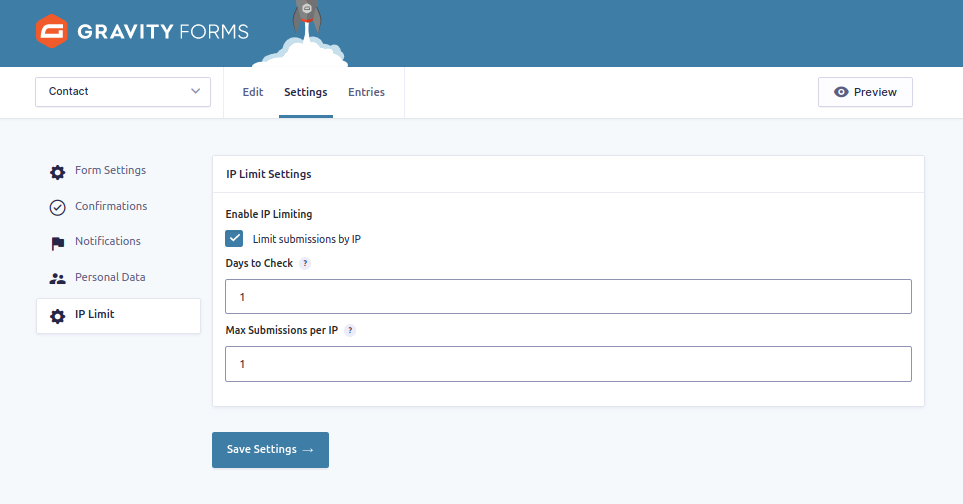
The Gravity Forms IP Limit Add-On allows you to restrict how many times a user can submit a form based on their IP address, within a specified number of days.
Features:
- Enable or disable IP limiting per form.
- Set a custom number of days to look back.
- Set the maximum number of submissions allowed from the same IP in that period.
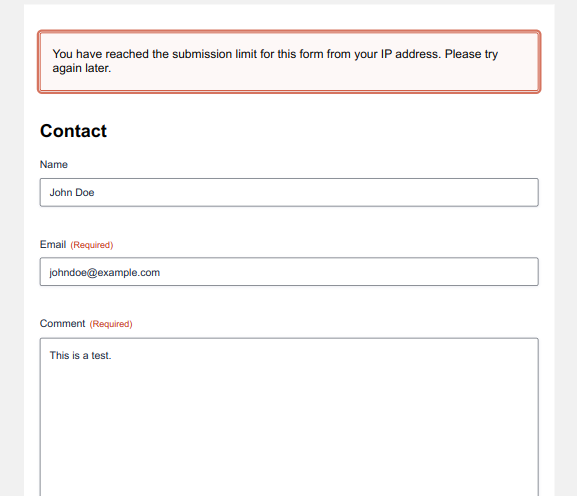
- Adds a validation error if the IP has already submitted too many times.
Perfect for:
* Preventing form abuse/spam
* Limiting contact form submissions
Screenshots
Installation
- Upload the plugin folder to
/wp-content/plugins/or install via WordPress Admin > Plugins > Add New > Upload Plugin. - Activate the plugin through the ‘Plugins’ menu.
- Navigate to Forms > [Your Form] > Settings > IP Limit to configure.
FAQ
-
Does this work for all forms?
-
Yes, you can enable or disable it per form in the form’s settings.
-
Can I set different limits for each form?
-
Yes, each form has its own setting for days and max entries.
-
What happens when a user hits the limit?
-
They will receive a validation error, and the form will not submit.
Reviews
There are no reviews for this plugin.
Contributors and Developers
“IP Limit Add-On for Gravity Forms” is open source software. The following people have contributed to this plugin.
Contributors
“IP Limit Add-On for Gravity Forms” has been translated into 1 locale. Thank you to the translators for their contributions.
Translate “IP Limit Add-On for Gravity Forms” into your language.
Interested in development?
Browse the code, check out the SVN repository, or subscribe to the development log by RSS.
Change Log
1.0
- Initial release.