

Description
Form Submission Email Reports collects and consolidates entries from popular form plugins and delivers them to your inbox on a schedule — so nothing slips through the cracks. Need a report right now? Use the Manual Report page to send a report for any custom date range, any form, and any recipient, on demand.
Supported sources
– Contact Form 7
– Gravity Forms
– Database for Contact Form 7, WPforms, Elementor forms (by CRM Perks)
– Advanced Contact Form 7 DB (by Vsourz Digital)
Key Features
– Scheduled email reports: Daily, Weekly, and Monthly.
– Manual Report — send a report for any form, date range, and recipient instantly from the WordPress admin.
– Supports Contact Form 7 and Gravity Forms as form sources.
– Sends reports to one or multiple email addresses (comma-separated).
– Secure CSV download link included in every report email.
– Automatically uses the site admin email as the default recipient.
– Simple, clean settings page with inline validation.
– Lightweight and optimized for performance.
Why you’ll like it
– Saves time compiling submissions from multiple plugins.
– Reduces missed messages with automated delivery.
– Send ad-hoc reports without waiting for the next scheduled run.
– Easy CSV download for audits, sharing, and record-keeping.
Screenshots
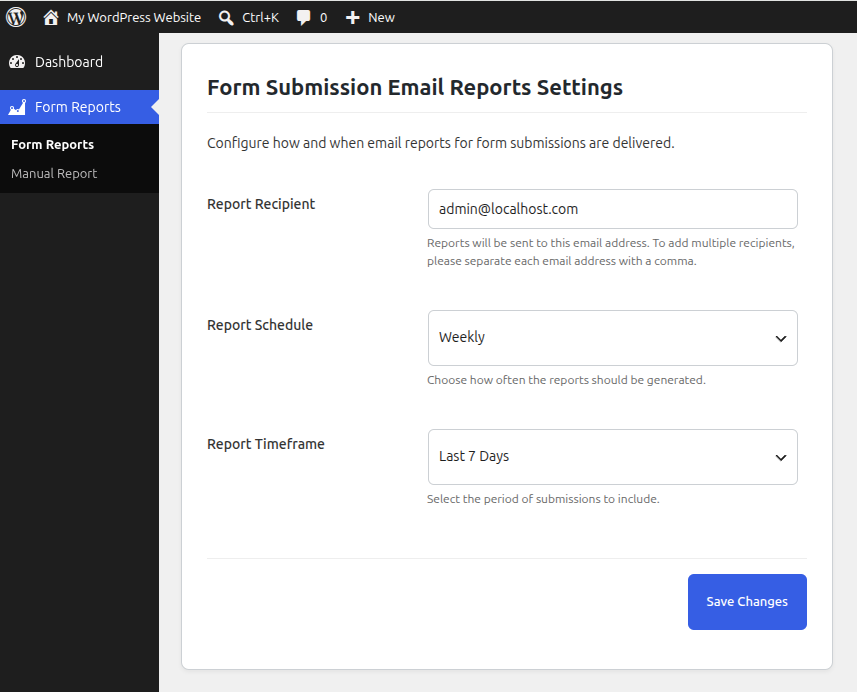
Form Reports Settings — Configure the report schedule, timeframe, and recipient email addresses. 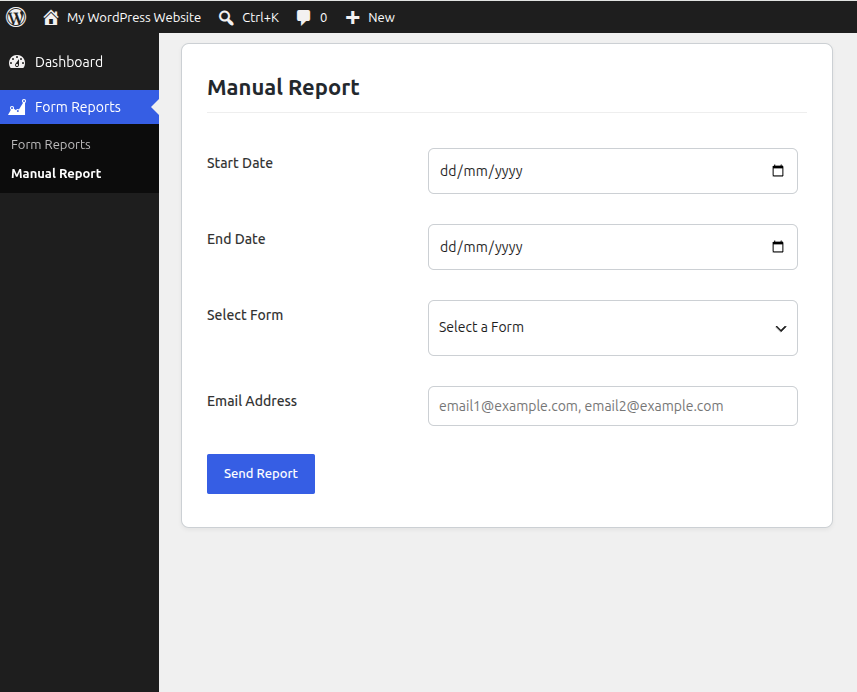
Manual Report — Send an on-demand report for any form and date range to any email address.
Installation
- Install and activate at least one source plugin:
– Contact Form 7 or Gravity Forms
– For CF7 entry storage, also install one of:- Advanced Contact Form 7 DB
- Database for Contact Form 7 (by CRM Perks)
- Download the plugin zip file.
- Go to Plugins > Add New in your WordPress admin.
- Click Upload Plugin, select the downloaded zip file, and click Install Now.
- Activate the plugin through the Plugins menu in WordPress.
- Go to Form Reports Form Reports to configure your schedule and recipients.
- To send an immediate report, go to Form Reports Manual Report.
FAQ
-
Do I need all the supported plugins installed?
-
No. You only need the plugins you actually use. The plugin reads from whichever combination of Contact Form 7 (with a storage add-on) or Gravity Forms is active.
-
Does this plugin store form submissions?
-
No. This plugin only reads existing submissions stored by your form plugin and sends them by email. For CF7 storage use Advanced CF7 DB or Database for Contact Form 7; Gravity Forms stores entries natively.
-
How do I send a report right now without waiting for the schedule?
-
Go to Form Reports Manual Report. Select a start date, end date, the form you want to report on, enter one or more recipient email addresses, and click Send Report.
-
Can I send a manual report to a different email than my scheduled report recipient?
-
Yes. The Manual Report page has its own Email Address field, completely independent of the scheduled report recipient configured in settings.
-
Can I filter the manual report to a single form?
-
Yes. The Manual Report page has a Select Form dropdown listing all available Contact Form 7 and Gravity Forms forms. The scheduled report always covers all forms.
-
How do I configure the scheduled report recipient?
-
Go to Form Reports Form Reports (the main settings page). Enter one or more email addresses separated by commas in the Report Recipient field.
-
Can I export submissions to a CSV file?
-
Yes. Every report email includes a secure per-form CSV download link. The link is valid without requiring the recipient to be logged in.
-
Are the download and view links in report emails secure?
-
Yes. Links use cryptographically signed HMAC tokens (keyed with your site’s AUTH_SALT) so they cannot be guessed or forged.
-
Why does the Gravity Forms report email not show a View link?
-
The Gravity Forms entries screen does not support filtering by a custom date range via URL, so the View link is omitted from manual report emails for Gravity Forms to avoid linking to an unfiltered list. The CSV Download link is always present. Scheduled report emails retain the View link since they use a different URL format.
-
What happens if I deactivate a required plugin after activation?
-
The plugin detects the missing dependency on every admin page load, automatically deactivates itself, and displays an admin notice explaining why.
Reviews

Contributors and Developers
“Form Submission Email Reports” is open source software. The following people have contributed to this plugin.
Contributors

Translate “Form Submission Email Reports” into your language.
Interested in development?
Browse the code, check out the SVN repository, or subscribe to the development log by RSS.
Change Log
1.9
- New: Manual Report page — send a report for any form, any custom date range, and any recipient instantly from the WordPress admin.
- New: Gravity Forms forms now appear in the Manual Report form selector alongside Contact Form 7 forms, grouped by source plugin.
- Improvement: Manual report emails for Gravity Forms omit the View link (Gravity Forms entries page does not support date-range URL filtering); the CSV Download link is always shown.
- Fix: Duplicate
admin_menuhook registration removed. - Fix: Undefined variable
$entryused before assignment in CSV export (Advanced CF7 DB branch). - Fix: Dead code block after
returnin manual report email function removed. - Fix: Undefined
$submission_daysin the “no records found” email message. - Fix: Duplicate
nameattribute on the email input in the manual report form. - Fix:
date()replaced withwp_date()on date inputs for correct site-timezone handling. - Fix: Cache key based on
time()(always a cache miss) replaced; manual reports now skip caching intentionally. - Improvement: Manual report POST handling moved to a dedicated
admin_postaction with proper redirect-after-POST, eliminating HTML-before-headers issues. - Improvement: Shared email-building and submission-fetching logic extracted into reusable helpers, eliminating ~200 lines of duplicated code.
- Improvement:
WPCF7_ContactForm::find()guarded withclass_exists()check to prevent fatal errors when CF7 is inactive. - Misc: All debug comments and commented-out code removed.
1.8
- Misc: Minor code optimizations. Improved CSV download for Gravity Forms entries.
1.7
- Improvement: Enhanced CSV export formatting for better readability, including proper handling of empty fields and special characters.
1.6
- New: Support for sending submission reports to multiple email addresses.
- Enhancement: Updated settings page to allow multiple recipients separated by commas.
- Improvement: Minor code optimizations for email handling and CSV generation.
- Misc: Bug fixes and performance improvements.
1.5
- New: Monthly email schedule for reports.
- Enhancement: Settings page refreshed with clearer layout, help text, and validations.
- Improvement: CSV export now humanizes headers and normalizes multiselect values across CRM Perks and Advanced CF7 DB.
- Fix: Ensured report counts match CSV rows by aligning filters with
submit_timeand ignoring malformed/empty timestamps. - Performance: Optimized queries and reduced memory footprint for large exports.
- Misc: Minor code clean-ups and bug fixes.
1.4
- Fix: Minor bugs related to form submission display.
- Improvement: Performance of the report generation module.
1.3
- Fix: Replaced session-based nonce tokens with persistent HMAC tokens so CSV download and view links work reliably after login.
- Fix: JavaScript auto-fill issue on the Advanced CF7 DB dashboard after redirect.
- Improvement: Public link handling for unauthenticated recipients.
1.2
- New: CSV download feature for form submissions.
- Misc: Minor code optimizations.
1.1
- New: Compatibility with Advanced Contact Form 7 DB plugin.
- Improvement: Report generation and email formatting.
- Misc: Minor performance optimizations.
1.0
- Initial release.
- Added support for retrieving submissions from Contact Form 7 and Gravity Forms.
- Scheduled email reporting functionality.