
Description
Rank Bix SEO is a lightweight, practical, and fully featured SEO plugin for WordPress. It helps website owners manage essential SEO settings without unnecessary bloat.
With Rank Bix SEO, you can optimize meta titles and descriptions, improve social sharing previews, generate XML and HTML sitemaps, output Schema / JSON-LD structured data, manage redirects, improve image SEO, analyze focus keywords, add breadcrumbs, duplicate pages, update SEO data in bulk, notify search engines instantly via IndexNow, serve an LLMs.txt file for AI systems, and monitor 404 errors.
Rank Bix SEO is built for blogs, business websites, WooCommerce stores, agencies, developers, and custom WordPress projects that need clean SEO tools inside one simple plugin.
Why Choose Rank Bix SEO?
- Lightweight SEO plugin for WordPress
- Clean and familiar WordPress admin interface
- Essential SEO tools without unnecessary complexity
- Works with posts, pages, WooCommerce products, and public custom post types
- Includes meta tags, social metadata, sitemaps, schema, redirects, breadcrumbs, image SEO, duplicate page, bulk editing, IndexNow, LLMs.txt, 404 Monitor, and broken link checking
- Optional AI meta generator with your own API keys
- Developer-friendly shortcodes and template functions
- Built with performance-focused module structure
Popular Features
- Meta Title & Description
- Open Graph & Twitter Cards
- XML Sitemap
- Schema / JSON-LD
- Image SEO
- Keyword Analysis
- Breadcrumbs
- Duplicate Page
- Redirections
- Bulk SEO Editor
- AI Meta Generator
- IndexNow
- LLMs.txt
- 404 Monitor
- Broken Link Checker
- Admin Toolbar Menu
- Robots.txt controls
- Canonical URLs
- Local Business schema
- Import SEO data from Yoast SEO, Rank Math, and All in One SEO
Meta Title & Description
Rank Bix SEO lets you manage custom SEO titles and meta descriptions for your WordPress content.
You can add custom SEO metadata from the post editor and configure global title templates for different content types.
Features include:
- Custom SEO title per post
- Custom meta description per post
- Homepage SEO title and description
- Title separator setting
- SEO title templates for post types
- Template variables including
%post_title%,%site_name%,%sep%,%category%,%author%,%year%,%excerpt%, and%term_title% - Custom canonical URL per post
- Per-post robots controls including noindex, nofollow, noarchive, and nosnippet
Open Graph & Twitter Cards
Rank Bix SEO helps control how your content appears when shared on social platforms.
Features include:
- Open Graph title
- Open Graph description
- Open Graph image
- Open Graph type and URL
- Twitter / X Card support
- Twitter title, description, and image tags
- Custom social image per post
- Global default social image fallback
- Summary large image card support
XML Sitemap
Rank Bix SEO includes sitemap support to help search engines discover and crawl your website content.
Features include:
- XML sitemap at
/sitemap.xml - HTML sitemap at
/html-sitemap/ - HTML sitemap shortcode:
[rankbix_seo_sitemap] - Google News sitemap at
/news-sitemap.xml - Image sitemap entries
- Featured image and inline image support
- Sitemap cache for better performance
- Automatic cache clearing when content changes
- Optional auto-ping for Google and Bing when new content is published
- Noindex content is automatically excluded from sitemaps
Schema / JSON-LD
Rank Bix SEO outputs structured data to help search engines better understand your website content.
Supported schema types include:
- Website
- WebPage
- Article
- BlogPosting
- Product
- Review
- HowTo
- FAQ
- BreadcrumbList
- Local Business
You can also choose schema types per post and create FAQ or HowTo schema data directly from the post editor.
Image SEO
Rank Bix SEO helps improve image SEO and accessibility by handling missing image attributes.
Features include:
- Automatically fills missing image alt text
- Uses attachment title or filename when alt text is missing
- Adds alt text for newly uploaded images
- Fixes missing alt and title attributes in post content images at display time
- Helps improve basic image SEO and accessibility
Keyword Analysis
Rank Bix SEO includes focus keyword analysis inside the post editor to help improve on-page SEO.
Features include:
- Focus keyword field
- On-page keyword checks
- SEO scoring inside the post editor
- Helpful content optimization suggestions
- Works with posts, pages, and supported custom post types
Breadcrumbs
Rank Bix SEO includes breadcrumb support for better navigation and structured data.
Features include:
- Breadcrumb shortcode:
[rankbix_seo_breadcrumbs] - Theme function:
rankbix_seo_breadcrumbs() - Custom breadcrumb separator
- BreadcrumbList JSON-LD schema output
- Useful for themes, page builders, and custom templates
Duplicate Page
Rank Bix SEO includes a built-in Duplicate Page feature so you can clone content without needing a separate plugin.
Features include:
- Duplicate posts, pages, and custom post types
- Choose which user roles can duplicate content
- Choose supported post types
- Configure duplicate link location
- Set duplicated content status
- Copy SEO meta data
- Copy custom fields
- Copy categories, tags, and taxonomies
- Keep original author if needed
Redirections
Rank Bix SEO includes a redirection manager to help manage changed URLs and avoid broken links.
Features include:
- 301 permanent redirects
- 302 temporary redirects
- 307 temporary redirects
- Enable or disable individual redirects
- Redirect hit counter
- CSV import
- CSV export
- Dedicated database table for performance
- Trailing-slash-aware matching
- Admin debug mode for redirect testing
Bulk SEO Editor
The Bulk SEO Editor helps you update SEO data for many posts at once.
Features include:
- Bulk edit SEO titles
- Bulk edit meta descriptions
- Bulk edit focus keywords
- Bulk manage noindex settings
- Filter by post type
- Filter by post status
- Filter by missing SEO title, description, or keyword
- Live character count
- SEO quality score per row
- Works with posts, pages, WooCommerce products, and custom post types
AI Meta Generator
Rank Bix SEO includes optional AI-powered SEO title and meta description generation.
Supported AI providers include:
- OpenAI / ChatGPT
- Anthropic / Claude
- Google Gemini
- Groq
- Cohere
AI features only work when you add your own API key. No data is sent to AI providers unless you configure an API key and manually click a generation button.
Features include:
- Generate SEO titles
- Generate meta descriptions
- Choose tone of voice
- Optional post content sharing
- Disable sending post content if needed
- Provider model selection
Table of Contents
Rank Bix SEO includes a simple Table of Contents feature for long-form content.
Features include:
- Auto-generated table of contents from H2 and H3 headings
- Enable per post in the SEO meta box
- Smooth scroll anchor links
- Customizable TOC title
IndexNow
Rank Bix SEO automatically notifies Bing, Yandex, and all IndexNow-participating search engines whenever a post or page is published or updated. It auto-generates and serves the required key verification file. Enable or disable in Settings Tools.
LLMs.txt
Rank Bix SEO generates and serves /llms.txt at your domain root to help AI systems understand your site. Includes a customisable content editor and an opt-in setting to block common AI crawlers (GPTBot, Claude-Web, CCBot, Bytespider, PerplexityBot, and others) via robots.txt.
404 Monitor
Rank Bix SEO logs all 404 errors to a dedicated database table (up to 500 entries, auto-pruned). The admin page shows the request URL, referrer, hit count, and last seen date. Clicking “+ Redirect” pre-fills the redirections form with the 404 URL for quick resolution.
Broken Link Checker
Rank Bix SEO includes an optional background broken link checker. A WP-Cron job runs twice daily checking external links in published post content using HTTP HEAD requests and stores up to 50 broken links. Disabled by default — opt-in in Settings Tools.
Admin Toolbar Menu
Rank Bix SEO adds a quick-access menu to the WordPress admin toolbar with links to Dashboard, Settings, Redirections, Sitemap, Bulk SEO, and 404 Monitor. Includes an External Tools submenu with one-click links to Google PageSpeed Insights, Rich Results Test, Search Console, Facebook Sharing Debugger, and Schema Markup Validator — pre-filled with the current page URL on the front end.
Advanced SEO Settings
Rank Bix SEO includes advanced controls for technical SEO.
Features include:
- Google Search Console verification
- Bing Webmaster Tools verification
- Pinterest verification
- Yandex Webmaster verification
- Custom robots.txt rules
- Sitemap URL added to robots.txt
- Noindex search pages
- Noindex date and author archives
- Canonical URL handling
- Local Business schema settings
- AI provider API key settings
Local Business Schema
Rank Bix SEO includes Local Business schema settings for business websites.
Fields include:
- Business name
- Business type
- Phone number
- Street address
- City
- Country code
Import SEO Data
Rank Bix SEO can import SEO data from popular SEO plugins.
Supported imports include:
- Yoast SEO
- Rank Math
- All in One SEO
The importer can transfer SEO titles, meta descriptions, focus keywords, canonical URLs, and noindex settings.
Shortcodes
Rank Bix SEO includes useful shortcodes:
[rankbix_seo_sitemap]
Display an HTML sitemap on any page.
[rankbix_seo_breadcrumbs]
Display breadcrumbs on any page or template area that supports shortcodes.
Developer Friendly
Rank Bix SEO includes a theme function for breadcrumbs:
<?php rankbix_seo_breadcrumbs(); ?>
You can add this directly inside your theme template files.
Built for Performance
Rank Bix SEO is designed to stay lightweight and fast.
Performance-focused features include:
- Cached XML sitemap
- Lazy AI model loading
- Dedicated redirect database table
- Fast redirect lookup
- Clean module-based plugin structure
- No unnecessary frontend bloat
Plugin Settings Sections
Rank Bix SEO includes simple admin settings sections:
- General
- Social
- Sitemap
- Advanced
- Local Business
- Tools
These sections help you manage the most important SEO features from one place.
Perfect For
Rank Bix SEO is useful for:
- Bloggers
- Business websites
- WooCommerce stores
- Agencies
- Developers
- Portfolio websites
- Local business websites
- Content-heavy websites
- Custom post type websites
Lightweight SEO for Better WordPress Rankings
Rank Bix SEO gives WordPress users a clean and practical way to manage SEO essentials, improve search visibility, create better social previews, generate structured data, manage redirects, and optimize content without installing many separate plugins.
External Services
Rank Bix SEO optionally connects to third-party AI services and search engine ping endpoints.
No data is sent to AI providers unless you configure an API key and manually click an AI generation button. Search engine pings can be disabled in settings.
AI Providers
The following services are contacted only when you have configured the corresponding API key in Rank Bix SEO Settings Advanced AI Keys and clicked an AI generation button in the post editor.
When triggered, Rank Bix SEO sends the post title, site name, tone preference, and optionally a plain-text excerpt of the post content. You can disable sending post content in the same settings screen.
OpenAI
- Endpoint:
https://api.openai.com/v1/chat/completionsfor generation andhttps://api.openai.com/v1/modelsfor model list - Data sent: post title, optional post content excerpt, site name, and tone preference
- Terms of Service: https://openai.com/policies/terms-of-use
- Privacy Policy: https://openai.com/policies/privacy-policy
Anthropic / Claude
- Endpoint:
https://api.anthropic.com/v1/messagesfor generation andhttps://api.anthropic.com/v1/modelsfor model list - Data sent: post title, optional post content excerpt, site name, and tone preference
- Terms of Service: https://www.anthropic.com/legal/aup
- Privacy Policy: https://www.anthropic.com/legal/privacy
Google Gemini / Generative Language API
- Endpoint:
https://generativelanguage.googleapis.com/v1beta/models/{model}:generateContentfor generation andhttps://generativelanguage.googleapis.com/v1/modelsfor model list - Data sent: post title, optional post content excerpt, site name, and tone preference
- Terms of Service: https://ai.google.dev/terms
- Privacy Policy: https://policies.google.com/privacy
Groq
- Endpoint:
https://api.groq.com/openai/v1/chat/completionsfor generation - Data sent: post title, optional post content excerpt, site name, and tone preference
- Terms of Service: https://groq.com/terms-of-use/
- Privacy Policy: https://groq.com/privacy-policy/
Cohere
- Endpoint:
https://api.cohere.com/v1/chatfor generation andhttps://api.cohere.com/v1/modelsfor model list - Data sent: post title, optional post content excerpt, site name, and tone preference
- Terms of Service: https://cohere.com/terms-of-use
- Privacy Policy: https://cohere.com/privacy
Search Engine Pings
When a post is published and the Auto-ping setting is enabled, Rank Bix SEO sends a lightweight HTTP GET request to notify search engines of the updated sitemap.
Only the public sitemap URL is transmitted. No post content, user data, or private content is sent.
- Google Ping:
https://www.google.com/ping?sitemap=<your-sitemap-url> - Bing Ping:
https://www.bing.com/ping?sitemap=<your-sitemap-url>
You can disable automatic pings at Rank Bix SEO Settings Sitemap Auto-pings Google & Bing on publish.
Google Privacy Policy: https://policies.google.com/privacy
Microsoft Privacy Statement: https://privacy.microsoft.com/en-us/privacystatement
IndexNow
When the IndexNow feature is enabled and a post or page is published or updated, Rank Bix SEO sends a single HTTP POST request to the IndexNow API endpoint to notify participating search engines (Bing, Yandex, and others) of the updated URL.
- Endpoint:
https://api.indexnow.org/indexnow - Data sent: your site hostname, a plugin-generated verification key, the URL of the verification key file, and the URL of the published/updated post or page. No post content or user data is sent.
- When: only on post/page publish or update, and only if IndexNow is enabled in Rank Bix SEO Settings Tools IndexNow.
IndexNow is an open protocol. The api.indexnow.org endpoint is operated by Microsoft. Submitted URLs are shared with all IndexNow-participating search engines.
IndexNow Privacy Policy: https://www.indexnow.org/privacypolicy
Microsoft Privacy Statement: https://privacy.microsoft.com/en-us/privacystatement
Broken Link Checker
When the Broken Link Checker feature is enabled, Rank Bix SEO runs a background cron job that sends HTTP HEAD requests to external URLs found in your post content to check whether those links are still reachable.
- Data sent: a standard HTTP HEAD request to each external URL found in your published post content. No post content, user data, or authentication credentials are included in these requests. The requests appear as ordinary browser-like HEAD requests to the destination server.
- When: only via a background WP-Cron job (runs twice daily, 5 posts per run). The feature is disabled by default and must be explicitly enabled in Rank Bix SEO Settings Tools Broken Link Checker.
- Destinations: any external URLs present in your own published post content. These are third-party URLs you have already linked to; Rank Bix SEO does not choose or control them.
No data from the broken link check is transmitted to Rank Bix SEO or any service operated by the plugin developer. Results are stored only in your own WordPress database.
Screenshots
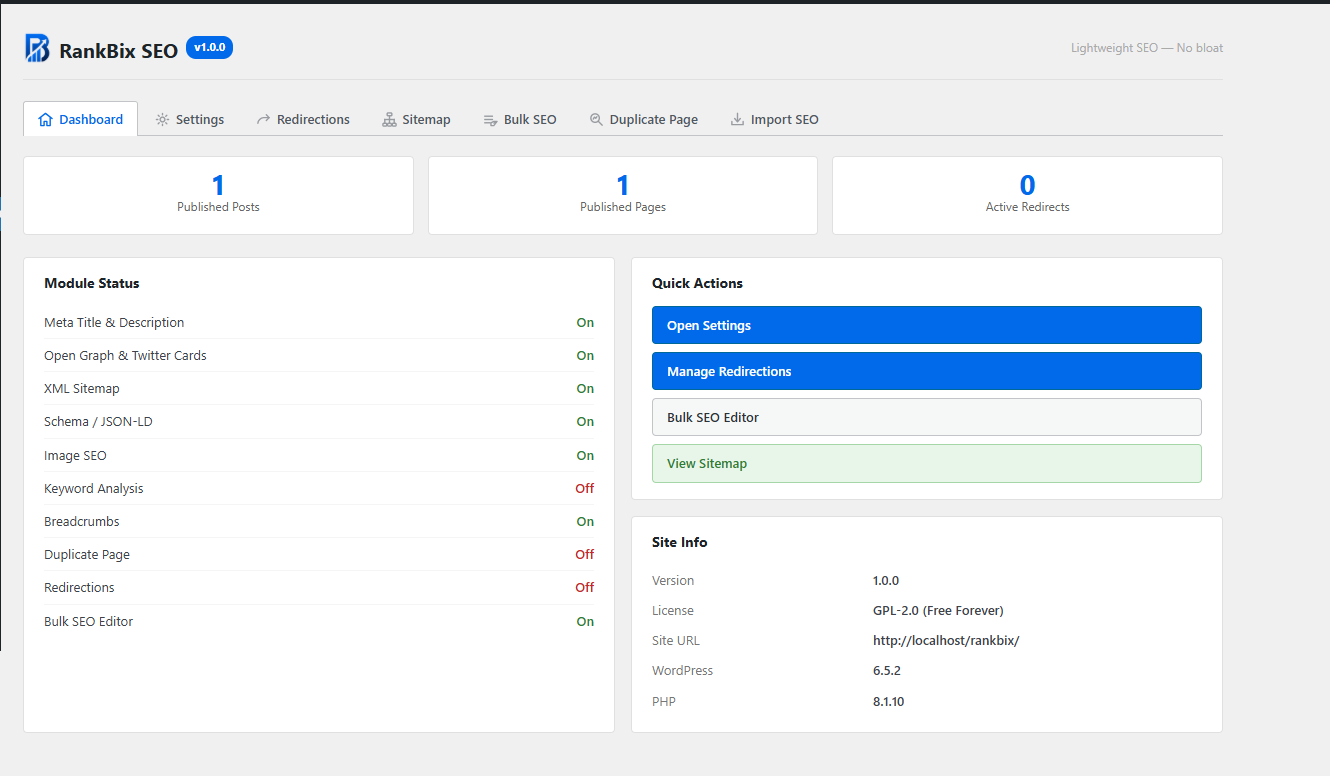
Rank Bix SEO dashboard with module status, quick actions, published content counts, and site information. 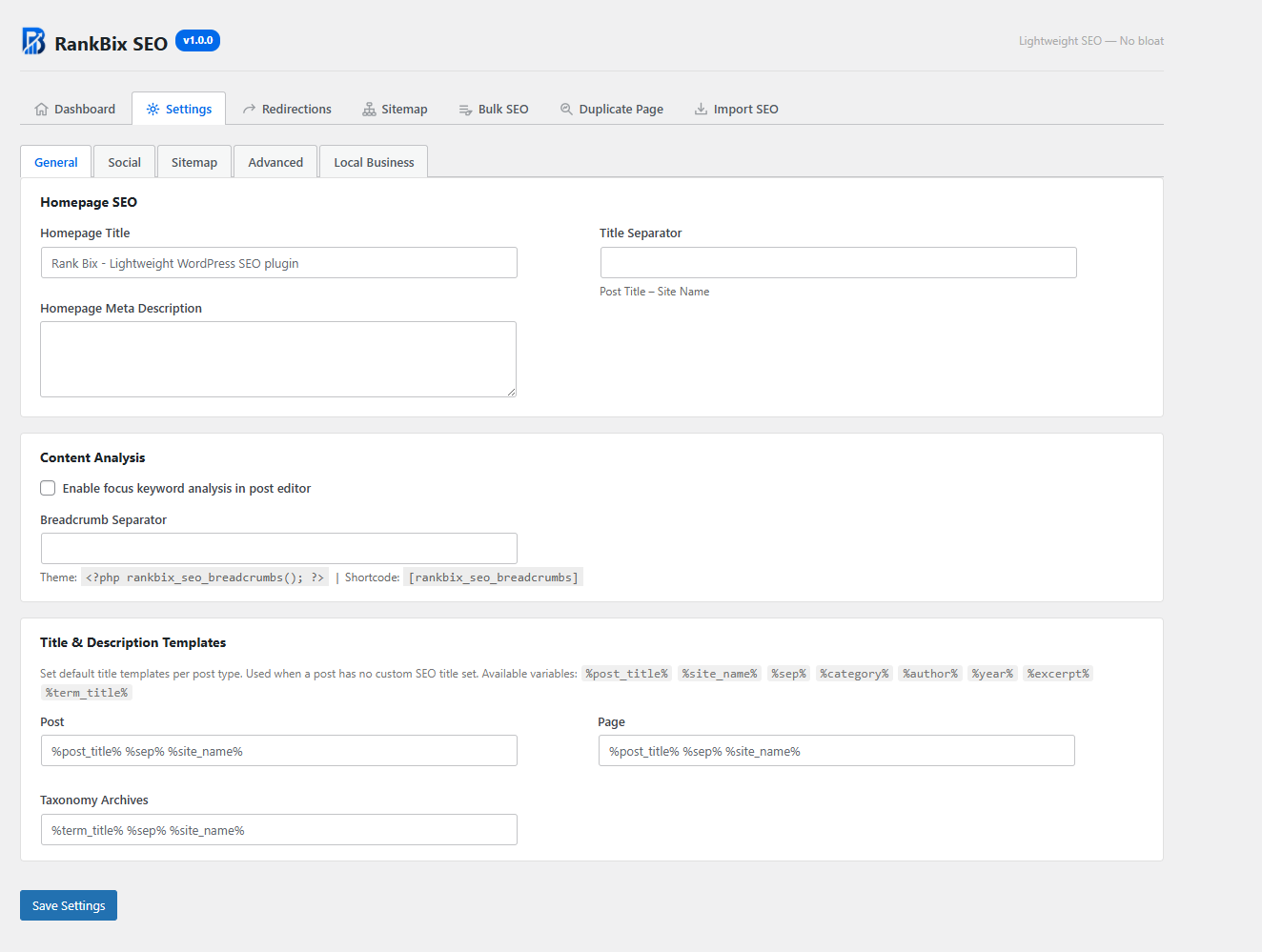
General SEO settings for homepage metadata, title separator, content analysis, breadcrumbs, and title templates. 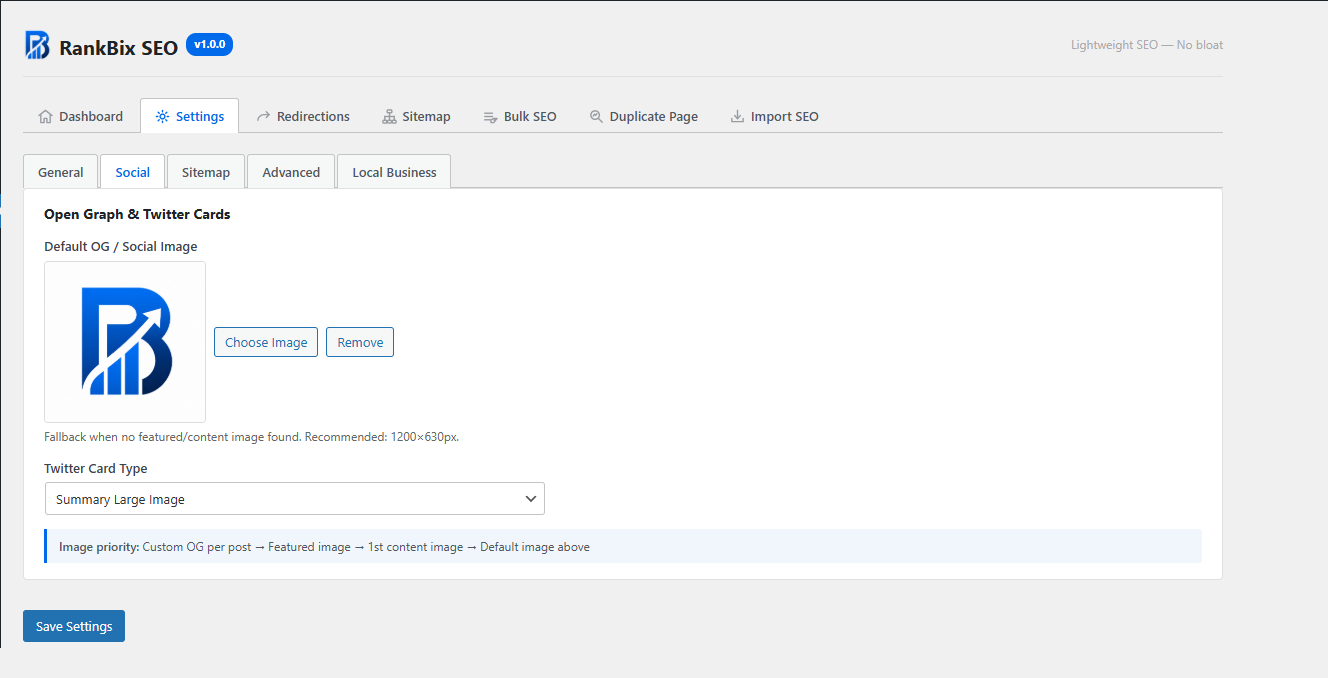
Social settings for Open Graph and Twitter Cards with default social image and Twitter card type. 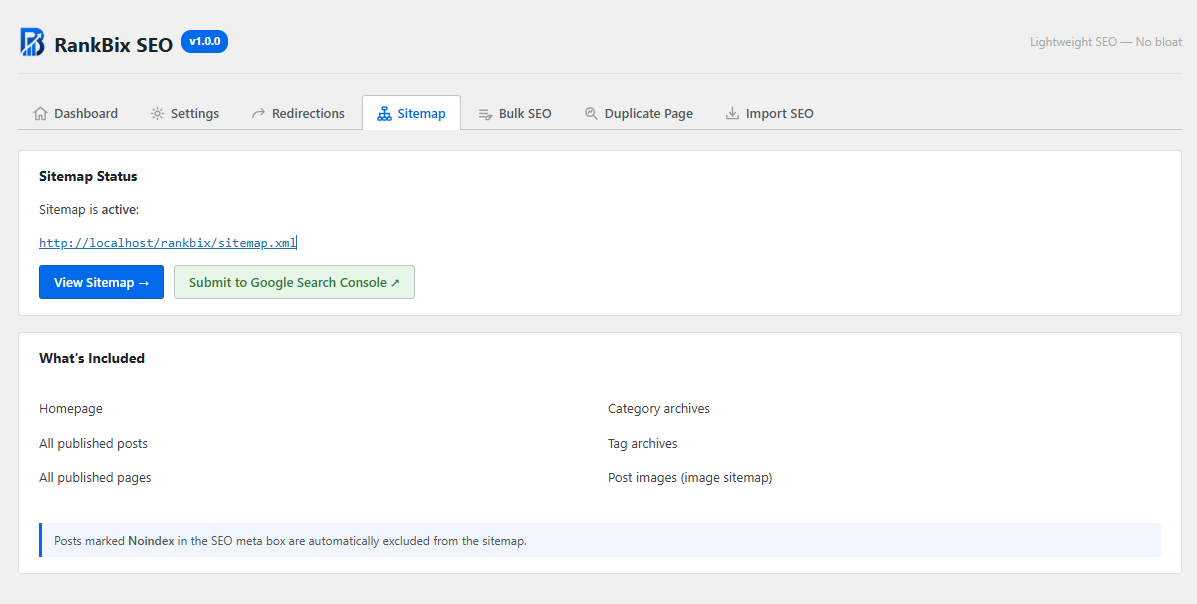
Sitemap status screen with active XML sitemap URL, Google Search Console action, and included sitemap content. 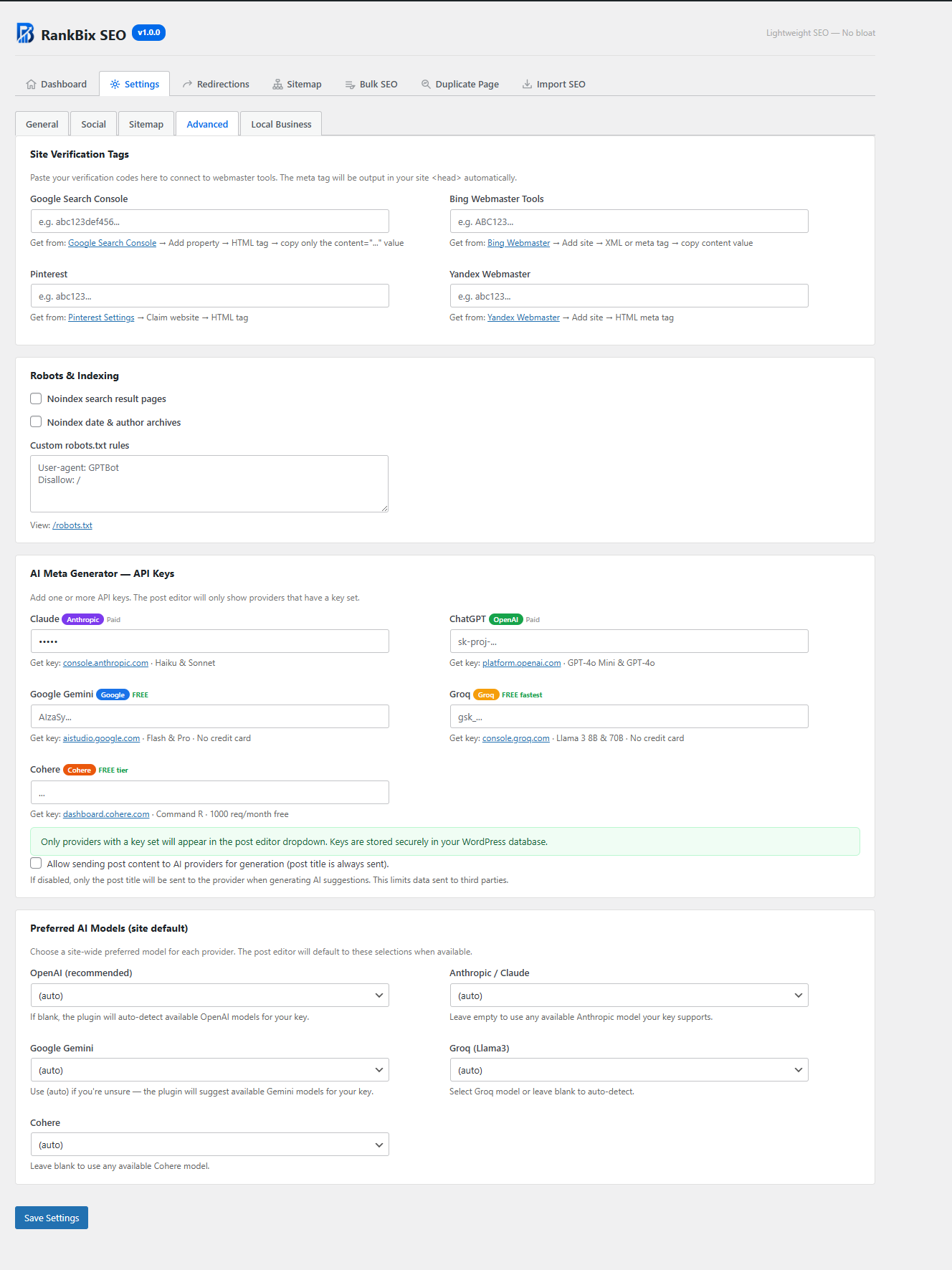
Advanced settings for webmaster verification tags, robots.txt rules, AI provider API keys, and preferred AI models. 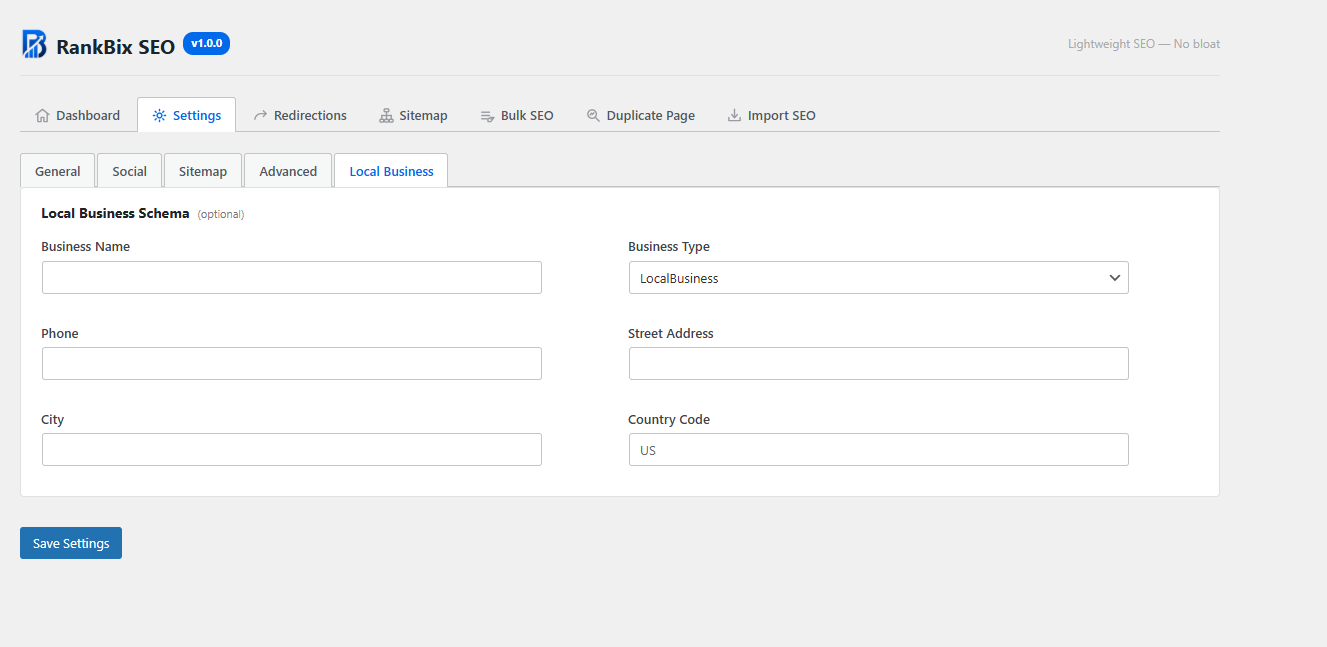
Local Business schema settings for business name, type, phone, address, city, and country code. 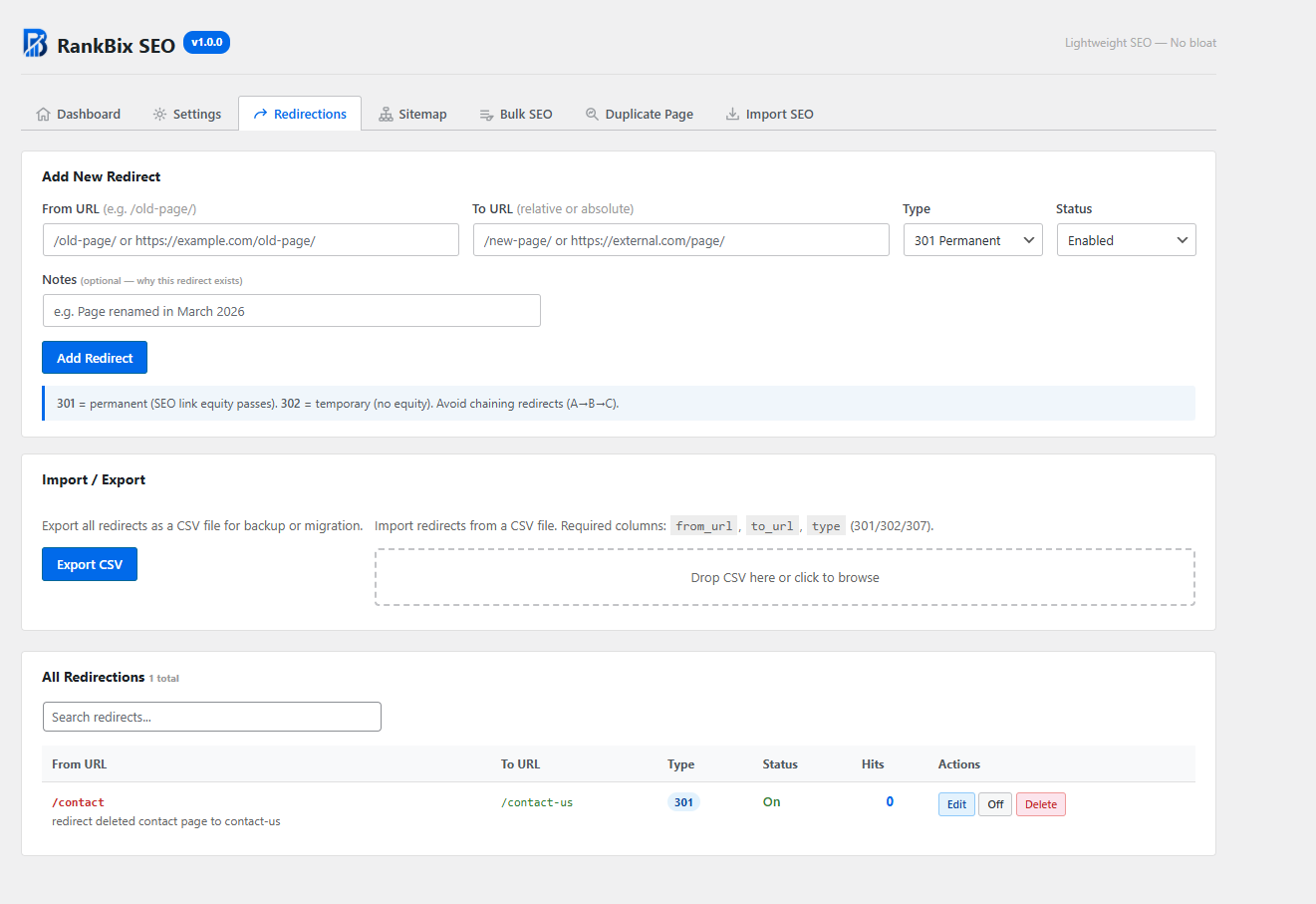
Redirections manager with 301, 302, and 307 redirect support, notes, CSV import/export, and redirect hit tracking. 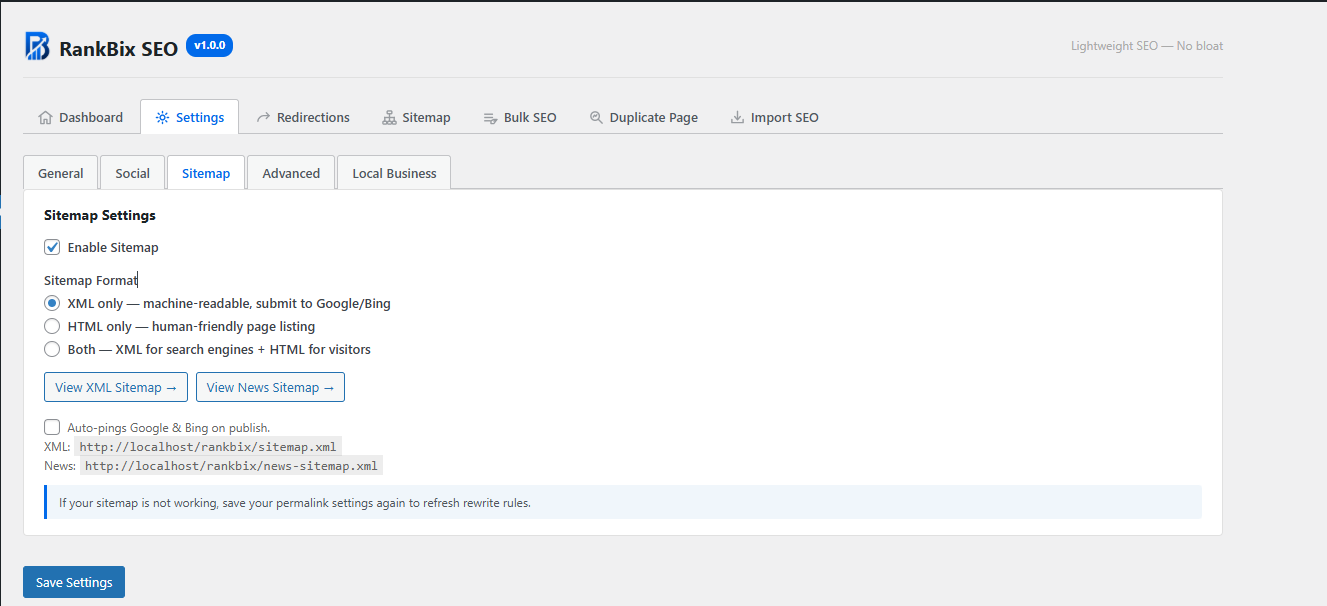
XML sitemap settings with sitemap format options, News sitemap link, and auto-ping settings for Google and Bing. 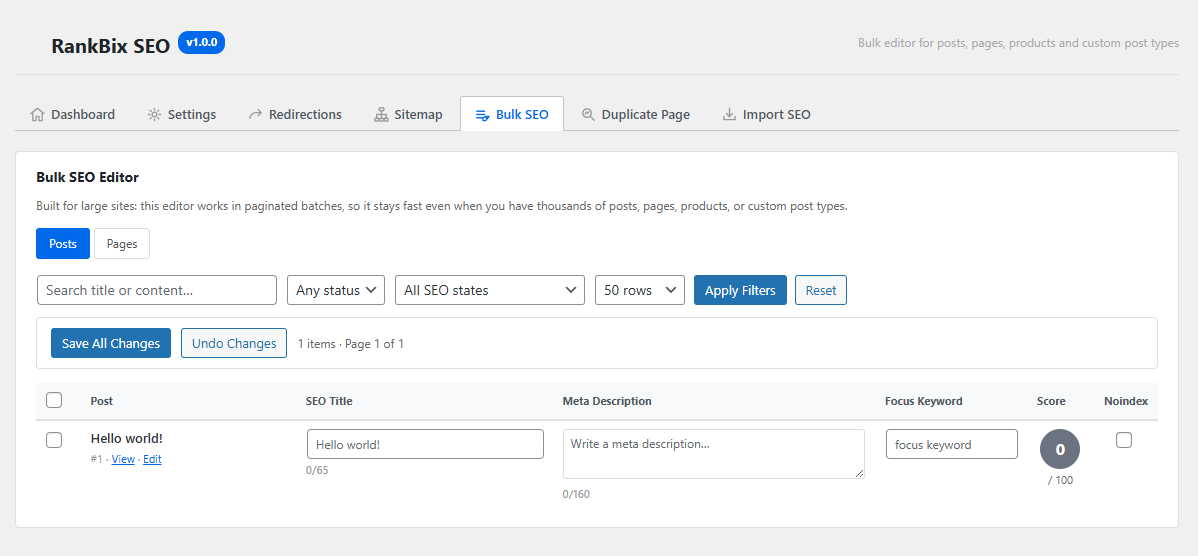
Bulk SEO Editor for editing SEO titles, meta descriptions, focus keywords, noindex status, and SEO scores across posts. 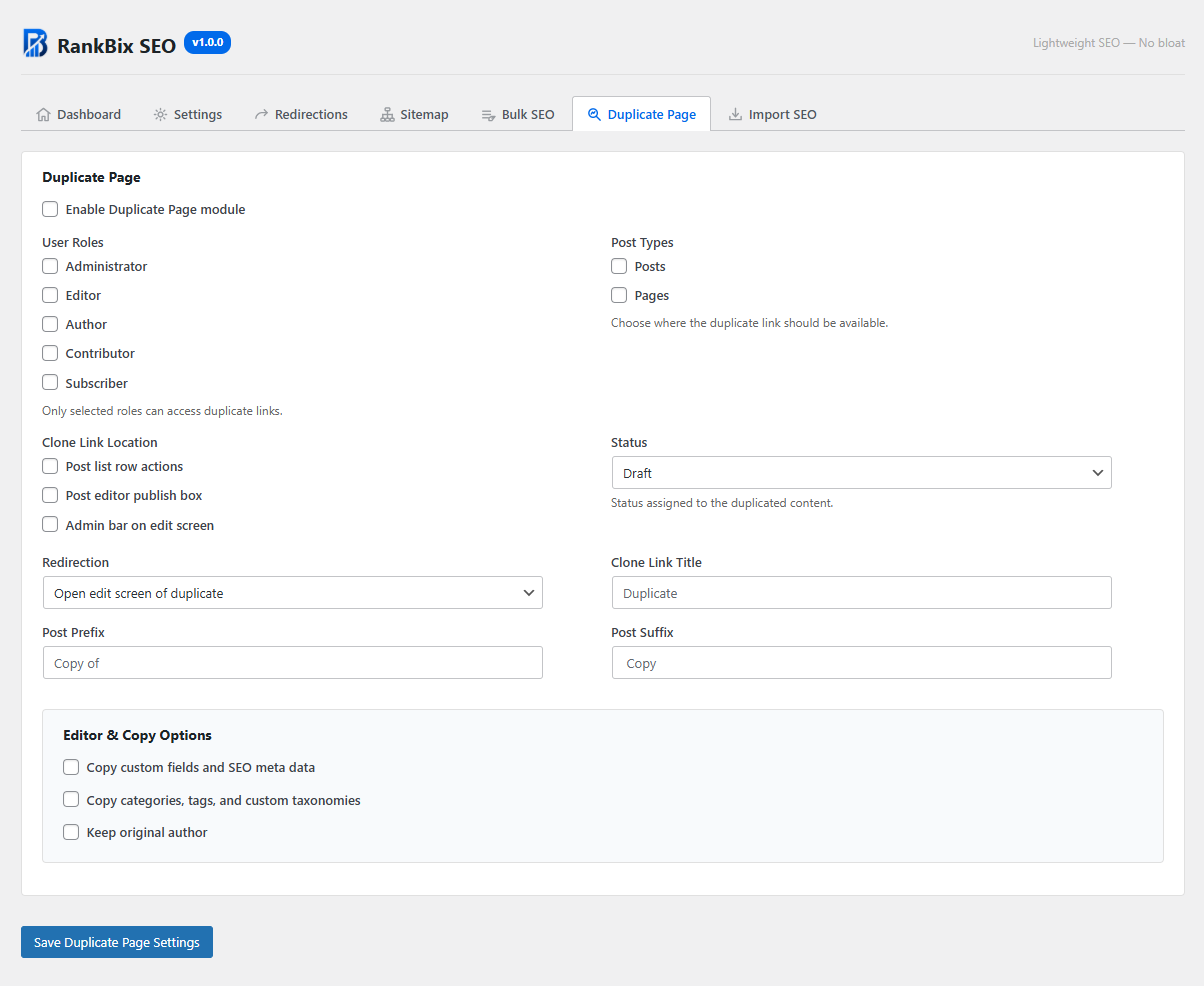
Duplicate Page settings for user roles, post types, clone link location, redirect behavior, status, and copy options. 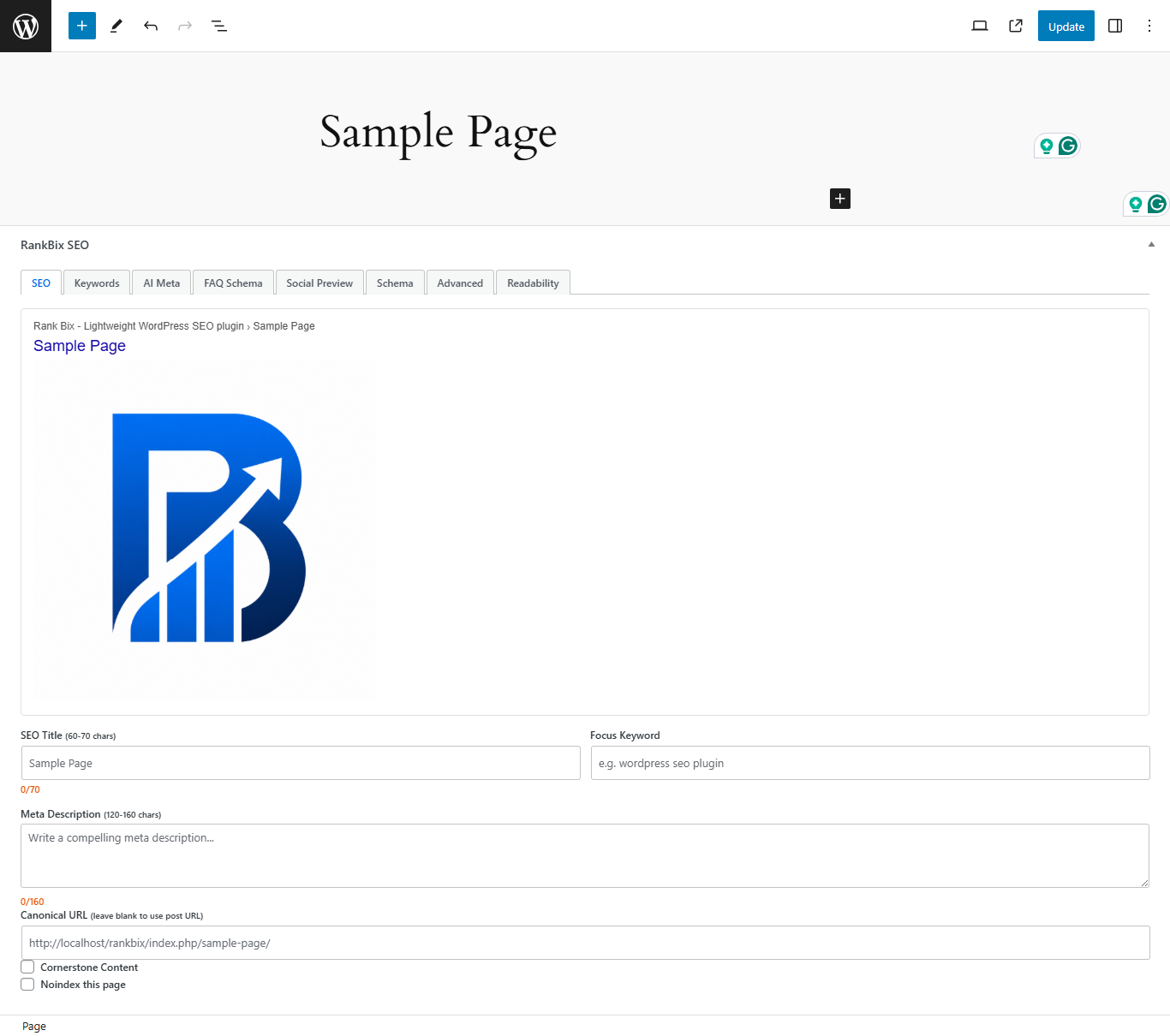
Post editor SEO meta box with SEO title, meta description, canonical URL, focus keyword, schema, AI meta tools, social preview, and readability tabs. 
Post listing with SEO Score column showing a colour-coded score badge for each post — green for good (70+), orange for OK (40–69), red for poor, and grey when no focus keyword is set. 
WordPress Plugin Check (PCP) results showing Rank Bix SEO passing all checks across General, Plugin Repo, Security, Performance, and Accessibility categories with no errors or warnings found.
Installation
- Upload the
rankbix-seofolder to/wp-content/plugins/. - Activate the plugin through Plugins Installed Plugins.
- Go to Rank Bix SEO in the WordPress admin menu.
- Configure your settings under Rank Bix SEO Settings.
- Edit any post or page to add SEO title, meta description, focus keyword, schema, social image, and other SEO settings.
FAQ
-
Does Rank Bix SEO work with WooCommerce?
-
Yes. Rank Bix SEO supports WooCommerce products in the post editor meta box, bulk SEO editor, sitemap, and schema features.
-
Does Rank Bix SEO support custom post types?
-
Yes. Rank Bix SEO supports public custom post types with UI. They can be used in the SEO meta box, sitemap, and bulk editor.
-
Can I import SEO data from Yoast SEO, Rank Math, or All in One SEO?
-
Yes. Go to Rank Bix SEO Import SEO and choose your source plugin. Rank Bix SEO can import SEO titles, meta descriptions, focus keywords, canonical URLs, and noindex settings.
-
Will Rank Bix SEO slow down my website?
-
No. Rank Bix SEO is designed for performance. The XML sitemap is cached, AI model lists are loaded only when needed, and redirects use a dedicated database table with a fast lookup process.
-
Do I need an API key for AI features?
-
Yes. You need at least one API key from a supported AI provider. AI features do nothing if no key is configured.
-
Is any data sent to AI providers automatically?
-
No. Data is only sent when you configure an AI provider API key and manually click an AI generation button in the post editor.
-
What data is sent to AI providers?
-
When you click an AI generation button, Rank Bix SEO sends the post title and optionally a plain-text excerpt of the post content to the selected provider. You can disable sending post content in Settings Advanced AI Keys Allow sending post content. When disabled, only the post title is sent.
-
Can I stop the plugin from pinging search engines?
-
Yes. Go to Rank Bix SEO Settings Sitemap and uncheck Auto-pings Google & Bing on publish.
-
Add this function to your theme template:
<?php rankbix_seo_breadcrumbs(); ?>Alternatively, use the shortcode:
[rankbix_seo_breadcrumbs] -
How do I display an HTML sitemap?
-
Use this shortcode on any page:
[rankbix_seo_sitemap]Optional shortcode attributes include
show_tags="0",columns="3", andorderby="date". -
Where is the redirect debug tool?
-
Visit any redirected URL and append
?rankbix_seo_debug_redirect=1. Logged-in administrators can see redirect match details instead of being redirected. -
Can I use Rank Bix SEO only for basic SEO?
-
Yes. You can use only the features you need, such as meta titles, descriptions, Open Graph, sitemap, schema, redirects, or breadcrumbs.
Reviews
There are no reviews for this plugin.
Contributors and Developers
“Rank Bix SEO” is open source software. The following people have contributed to this plugin.
Contributors
“Rank Bix SEO” has been translated into 1 locale. Thank you to the translators for their contributions.
Translate “Rank Bix SEO” into your language.
Interested in development?
Browse the code, check out the SVN repository, or subscribe to the development log by RSS.
Change Log
1.1.1
Improvements
- Improved Tools settings UI — IndexNow, LLMs.txt, 404 Monitor, and Broken Link Checker settings are now grouped with clearer labels, toggle descriptions, and inline status indicators showing whether each feature is active.
- Added manual broken link scan button — administrators can now trigger an immediate scan from the Tools settings page instead of waiting for the twice-daily cron job. Useful after publishing new content or adding external links.
- Improved importer result messages — the SEO importer now reports exactly how many titles, descriptions, focus keywords, canonical URLs, and noindex values were transferred, with a clear count of skipped and failed records.
- Improved onboarding for new users — the dashboard now shows a setup checklist on first activation, highlighting key steps such as setting a homepage title, configuring the sitemap, and enabling IndexNow. Checklist auto-hides once all steps are complete.
- Added success notice when applying an AI-generated title or description — a green confirmation message appears briefly after clicking “Use This Title” or “Use This Description”.
AI Meta Generator
- Fixed “Generate Title + Description” returning only the title. A dynamic Gemini
responseSchemanow enforces bothtitleanddescriptionkeys at the API level, and the prompt explicitly states both fields are required. - Fixed Gemini 404 errors caused by the model list returning names prefixed with
models/, which doubled the path in the generate URL (.../models/models/gemini-2.0-flash:generateContent). Prefix is now stripped correctly. - Updated default Gemini model from deprecated
gemini-1.5-flashtogemini-2.0-flash. Updated meta box quick-select options togemini-2.0-flashandgemini-2.5-flash. - Added
responseMimeType: application/jsonandresponseSchemato Gemini requests — forces clean JSON output with no markdown code fences or explanation text, eliminating the most common parse failure. - Updated default Claude model to
claude-haiku-4-5-20251001(fully versioned ID for production stability). - Updated default Groq model from deprecated
llama3-8b-8192tollama-3.1-8b-instant. Added Groq to the live model list fetch so the retry fallback has real model options. - Upgraded Cohere from the deprecated v1
/v1/chatAPI (usingmessage+preamblefields) to the current v2/v2/chatAPI (usingmessagesarray). Updated response extraction to match the v2 response structure. - Improved AI prompt rules — title and description character limit instructions are now only shown for the relevant field type. Added explicit “MUST contain BOTH keys” instruction for the combined title + description request.
- Improved JSON response parsing — strips UTF-8 BOM before decoding, falls back to field-level regex extraction when
json_decodefails due to unescaped characters, and shows the full raw response in the error message for easier debugging. - Increased
maxOutputTokensfrom 400 to 800 across all providers to prevent response truncation mid-JSON.
Table of Contents
- Fixed auto-insert TOC not appearing on the front end. The stylesheet was being enqueued inside the
the_contentfilter which fires afterwp_head(), so the CSS never loaded. Moved enqueueing to thewpaction hook so styles are always included in the page<head>. - Fixed auto-insert not working with Gutenberg content. Gutenberg renders paragraphs with class attributes (
<p class="wp-block-paragraph">). The previous check for a bare<p>missed these, causing the TOC to be prepended outside of the content flow. Now uses offset-basedsubstrinsertion that matches any opening paragraph tag. - Redesigned TOC styling — replaced admin-only CSS variable (
--wp-rankbix-seo-color) with self-contained CSS variables defined inside.rankbix-seo-toc, added card shadow, title separator,display: blocklayout withmax-width: 480px,lower-alphasub-list style, link hover transition, smooth scroll viahtml:has(.rankbix-seo-toc), and full-width mobile handling.
Bug Fixes
- Fixed Google PageSpeed Insights toolbar link using the wrong URL path (
?url=instead of/analysis?url=), which opened the PageSpeed homepage rather than running an analysis on the current page. - Fixed AI generate buttons (“Generate Title + Description”, “Title Only”, “Description Only”) remaining disabled after selecting a provider and reloading the page. The model dropdown was pre-selecting a saved model but never calling
rmsOnProviderChange()to update button state. Fixed by callingrmsOnProviderChange()immediately after the dropdown is populated. - Fixed layout overflow on the Bulk SEO Editor table on narrow admin screens.
- Fixed Tools settings toggles not saving correctly when multiple options were changed at the same time.
- Improved compatibility with caching plugins by ensuring the LLMs.txt physical file is refreshed when settings change rather than relying solely on the transient.
1.1.0
New Features
- Added IndexNow — automatically notifies Bing, Yandex, and all IndexNow-participating search engines when a post or page is published or updated. Auto-generates and serves the required key verification file.
- Added LLMs.txt — serves /llms.txt describing your site to AI systems. Includes a customisable content editor and an opt-in setting to block common AI crawlers (GPTBot, Claude-Web, CCBot, Bytespider, PerplexityBot, and others) via robots.txt.
- Added 404 Monitor — logs all 404 errors to a dedicated database table (up to 500 entries, auto-pruned). Admin page shows URL, referrer, hit count, and last seen date. Clicking “+ Redirect” opens the redirections form with the URL pre-filled.
- Added Broken Link Checker — background WP-Cron job (twice daily, 5 posts per run) checks external links in published post content using HTTP HEAD requests. Stores up to 50 broken links. Disabled by default; opt-in in Settings Tools.
- Added Tools settings tab — centralised settings for IndexNow, LLMs.txt, 404 Monitor, and Broken Link Checker.
- Added WordPress toolbar (admin bar) menu with quick links to Dashboard, Settings, Redirections, Sitemap, Bulk SEO, and 404 Monitor.
- Added External Tools submenu in the toolbar with one-click links to Google PageSpeed Insights, Google Rich Results Test, Google Search Console, Facebook Sharing Debugger, and Schema Markup Validator — pre-filled with the current page URL where applicable.
Security Fixes
- Fixed Gemini API key being sent as a URL query parameter (
?key=). Key is now sent via theX-Goog-Api-Keyheader, keeping it out of server logs and browser history. - Fixed inverted condition in
fill_missing_alt()andfix_img_tag()that would silently overwrite intentionally set alt text on images. - Fixed
rmsImportStatus()usinginnerHTMLwith partially controlled content. Replaced withtextContentandcreateElementto prevent potential XSS. - Fixed internal link suggestion results injecting unescaped
s.urlintohrefandonclickattributes. All URL values are now handled viacreateElementandaddEventListener. - Fixed
sanitize_text_field()being applied to$_SERVER['REQUEST_URI']before URL parsing, which stripped valid percent-encoded characters and caused redirect matching to fail for encoded URLs. - Added rate limiting (20 requests per user per hour) to the AI meta generation AJAX handler to prevent API quota exhaustion.
- Added explicit
current_user_can('manage_options')capability check torender_duplicate_page(). - Fixed
suppress_all_notices()callingremove_all_actions('admin_notices'), which silently removed security alerts from other plugins (Wordfence, Jetpack, etc.) on RankBix SEO admin pages.
Bug Fixes
- Fixed Duplicate Page title prefix and suffix settings never taking effect. Activation wrote
rankbix_seo_duplicate_prefixbut the class readrankbix_seo_duplicate_title_prefix. - Fixed Google News sitemap always pinging Google regardless of the auto-ping setting.
- Fixed date archive canonical URL returning an empty string. Now uses
get_year_link(),get_month_link(), andget_day_link(). - Fixed HTML sitemap
the_contentfilter replacing all post content on the virtual sitemap page instead of only the sitemap post. - Fixed duplicate Sitemap entry in robots.txt caused by both
RankBixSEO_RobotsandRankBixSEO_Sitemapindependently appending the sitemap URL.
Performance
- XML sitemap output is now cached in a one-hour transient and automatically invalidated on
save_postanddelete_post. - AI provider model list is no longer fetched on every post editor page load. Now loaded lazily via AJAX only when the AI tab is opened, removing up to four blocking external HTTP requests per edit screen load.
Code Quality
- Removed all
// phpcs:ignoreFileblanket suppressions fromclass-rankbix-seo-admin.php,uninstall.php, andclass-rankbix-seo-importer.php. Replaced with targeted inline suppression comments where genuinely needed. - AIOSEO importer now processes records in batches of 100 instead of loading the entire table into memory.
RankBixSEO_Admin::header()andfooter()madepublic static.RankBixSEO_BulkEditornow uses the shared header and footer, eliminating a duplicate nav implementation that was missing the 404 Monitor tab.- Removed orphaned nonce field emitted outside the
<form>tag in the Bulk SEO Editor. - Removed duplicate
$raw_fromassignment and redundant tripleesc_sql()calls in the redirections handler.
1.0.0
- Initial release.
- SEO title and meta description management.
- Focus keyword analysis with on-page scoring.
- Open Graph and Twitter Card tags.
- XML sitemap with image entries and auto-ping.
- HTML sitemap and shortcode.
- Google News sitemap.
- Schema / JSON-LD support for Article, Product, Review, HowTo, FAQ, BreadcrumbList, and LocalBusiness.
- Redirections manager with 301, 302, and 307 support.
- CSV import/export for redirects.
- Bulk SEO editor with pagination and filters.
- AI meta generator for OpenAI, Claude, Gemini, Groq, and Cohere.
- Breadcrumbs function and shortcode.
- Table of Contents with smooth scroll.
- Image SEO auto alt text handling.
- Duplicate Page with configurable options.
- Robots.txt custom rules.
- Custom canonical URLs.
- Importer for Yoast SEO, Rank Math, and All in One SEO.
- Webmaster verification tags.